
Spend intelligence for retail banking
Eurisko PFM: Personal Finance Management for Oman
Eurisko PFM helps Oman’s banks add personal finance management customers actually use: every payment categorised and explained, budgets and savings goals in Arabic and English, and a console your business team runs itself.
- Steps in every categorisation, each one shown to the customer
- 4
- Home widgets customers can switch on, resize and rearrange
- 18
- Features the bank can switch on or off for each segment
- 36
- Languages, Arabic and English, with true right-to-left design
- 2
Personal finance management customers actually open.
Most banking apps already have a “my expenses” tab: a pie chart, a list, and categories the customer cannot correct. Customers look once and do not return, and the bank learns nothing from it.
Eurisko PFM is built the other way round. Every screen opens with a plain sentence that says what happened to the customer’s money, every figure leads somewhere, and every category comes with the reason it was chosen. When the product gets it wrong, the customer fixes it in one tap and it stays fixed.
For the bank, PFM is also a channel. Product and marketing teams see how customers use it, decide which segment gets which feature, and turn spending behaviour into relevant offers. That is spend intelligence with approval and audit built in.
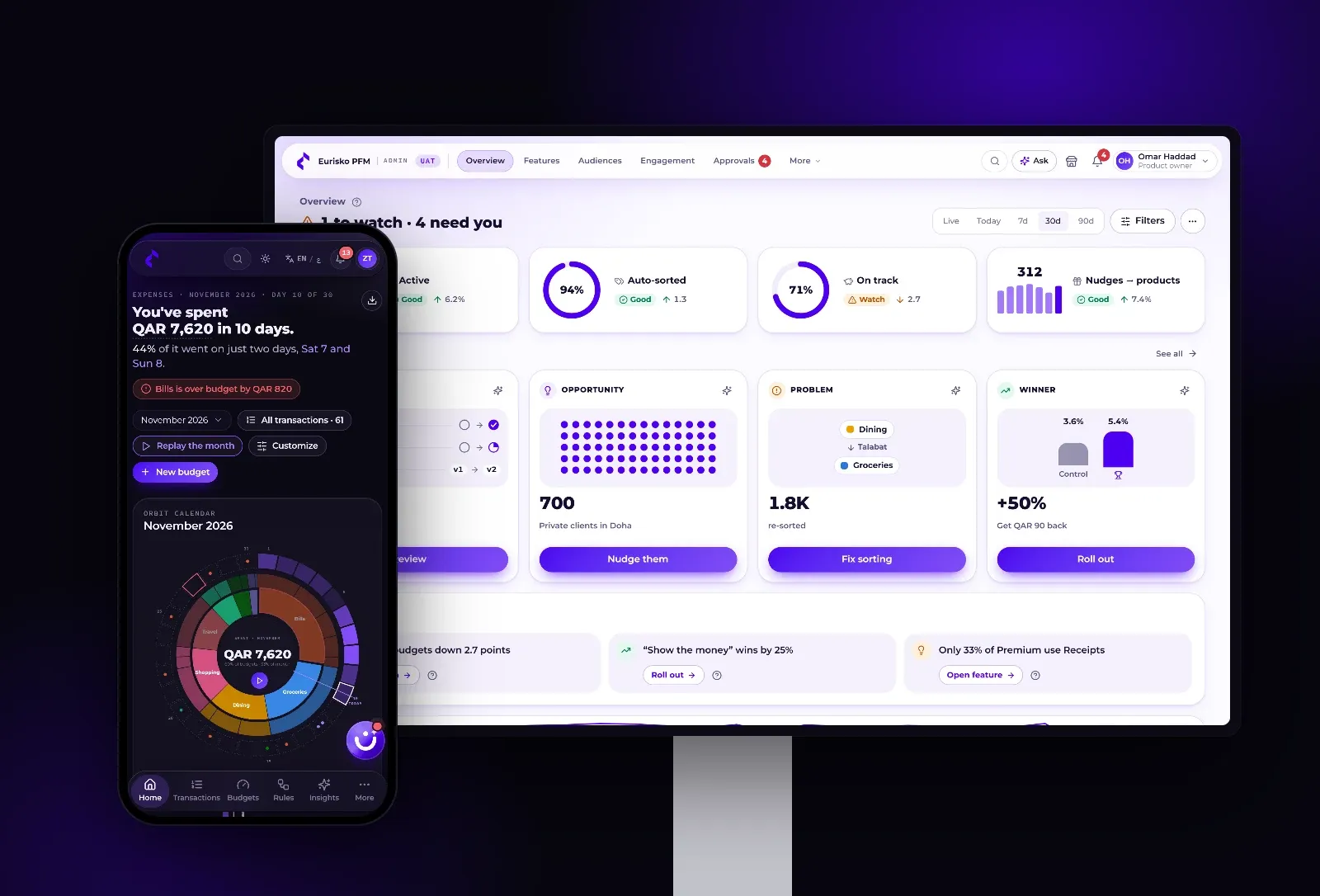
Screens show demonstration data.
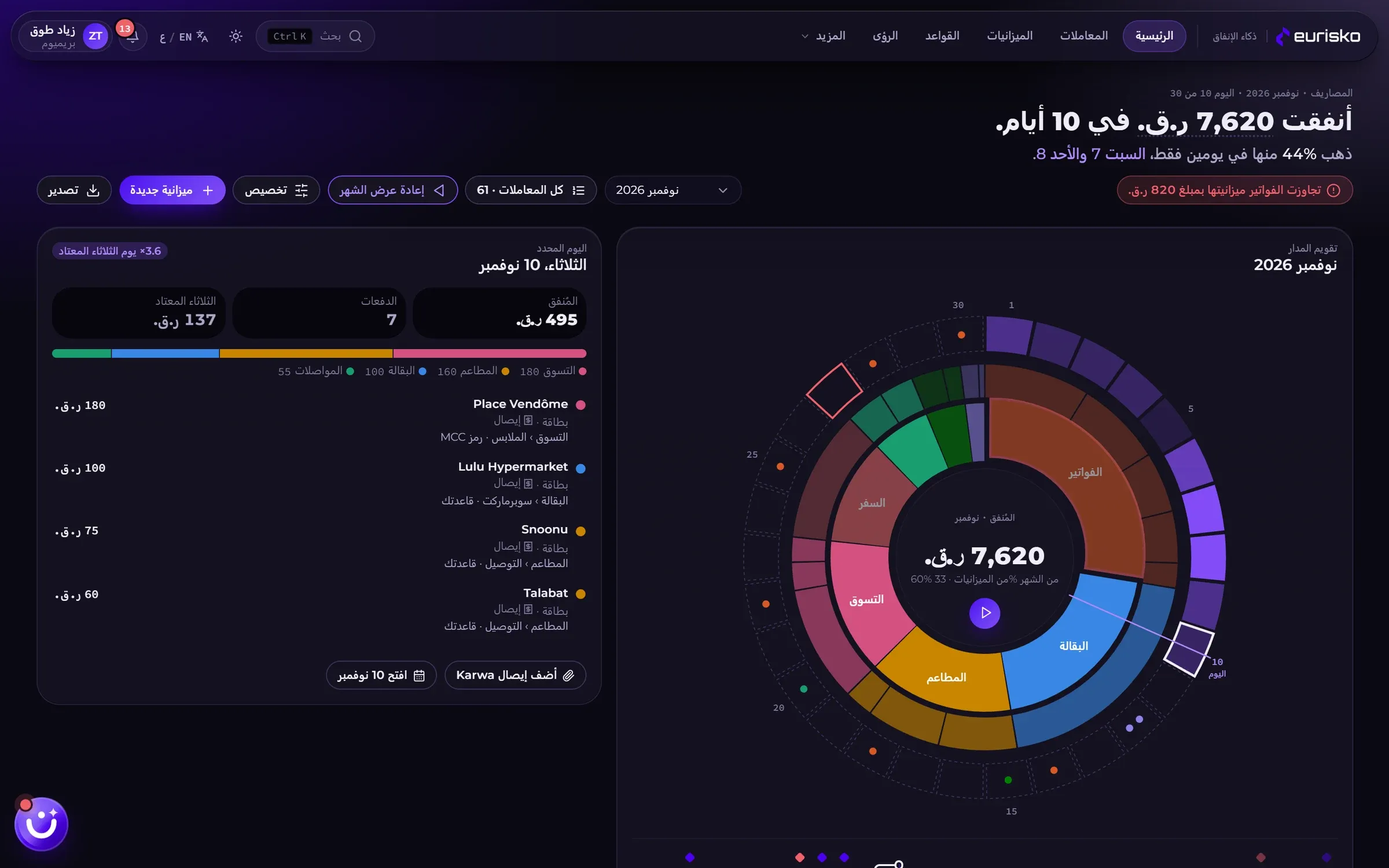
The whole month, readable at a glance.
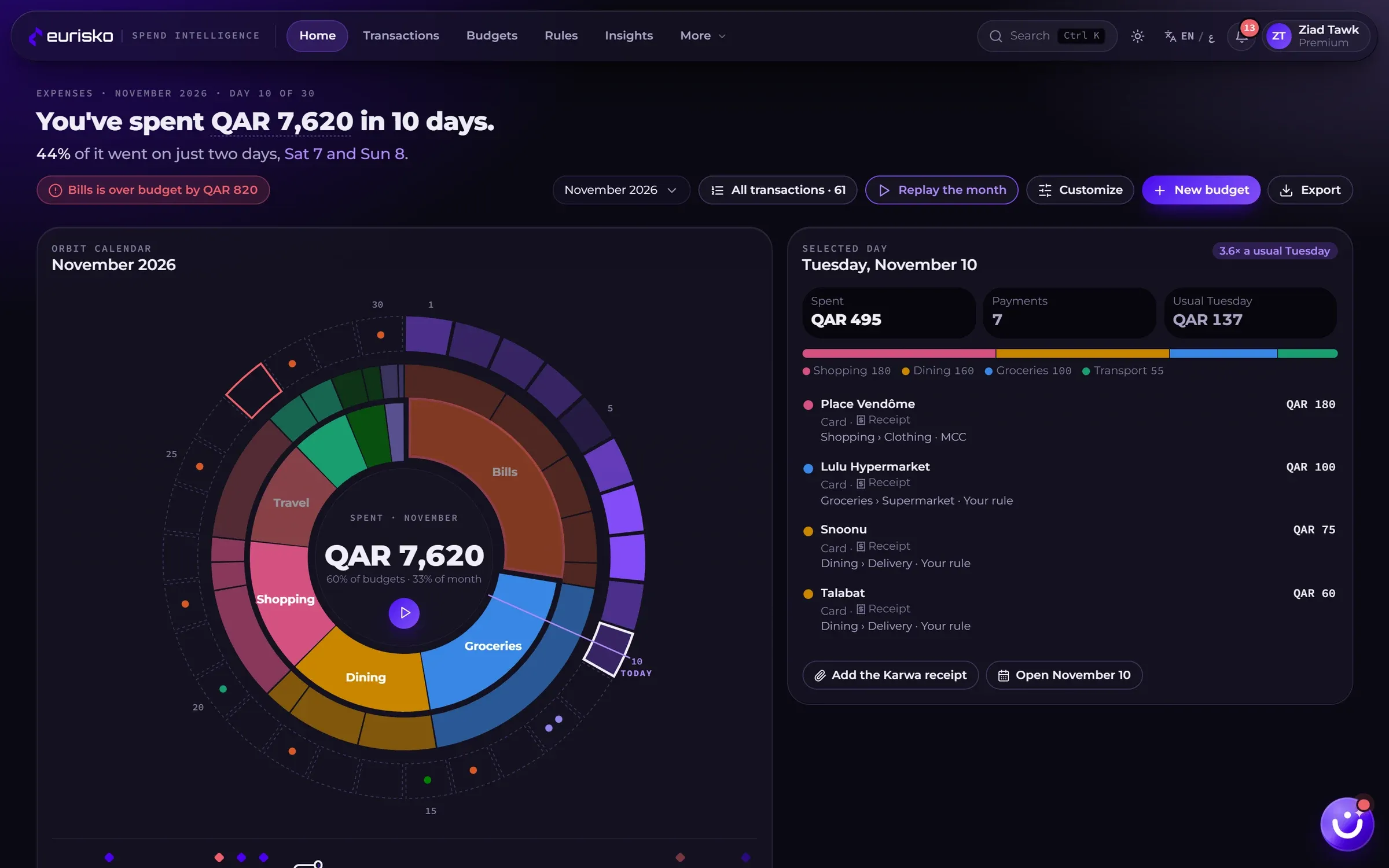
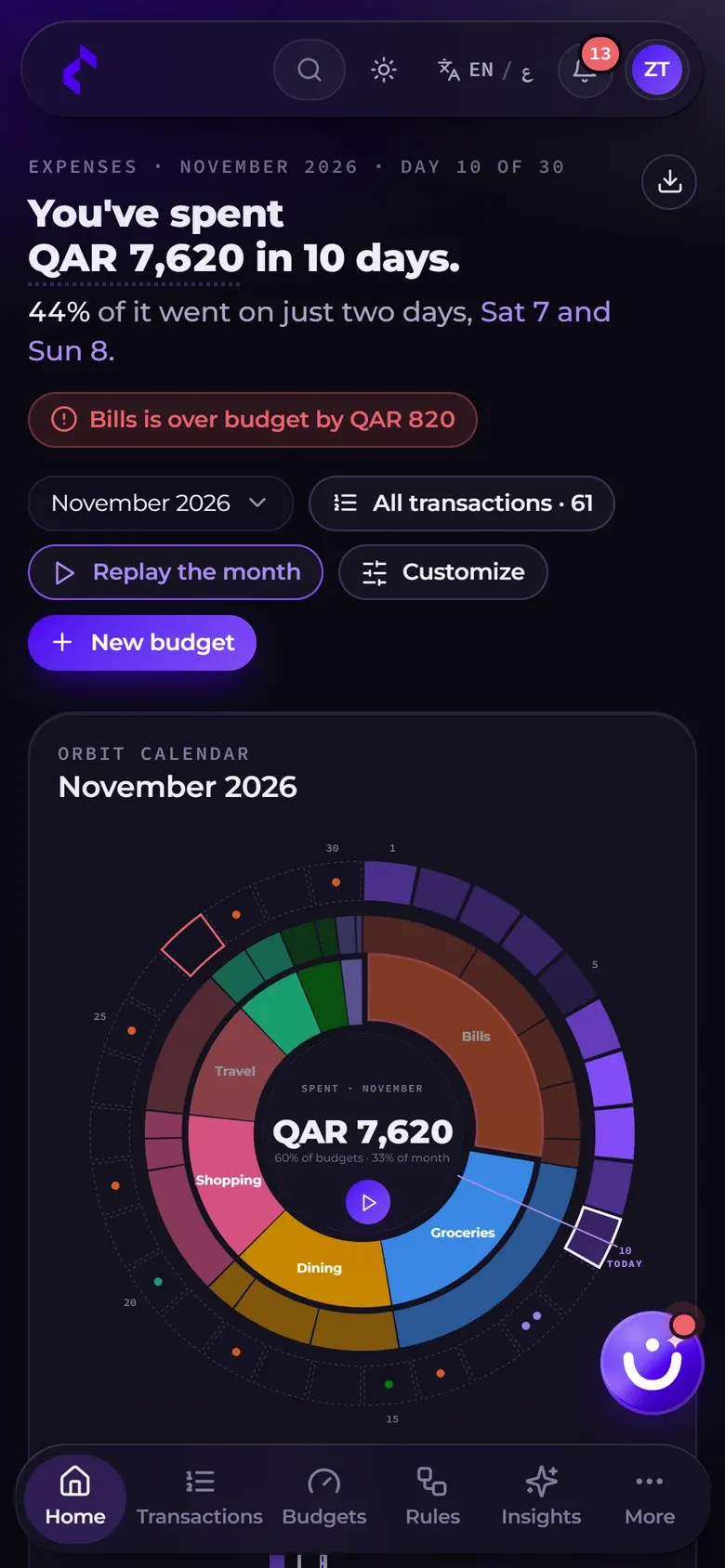
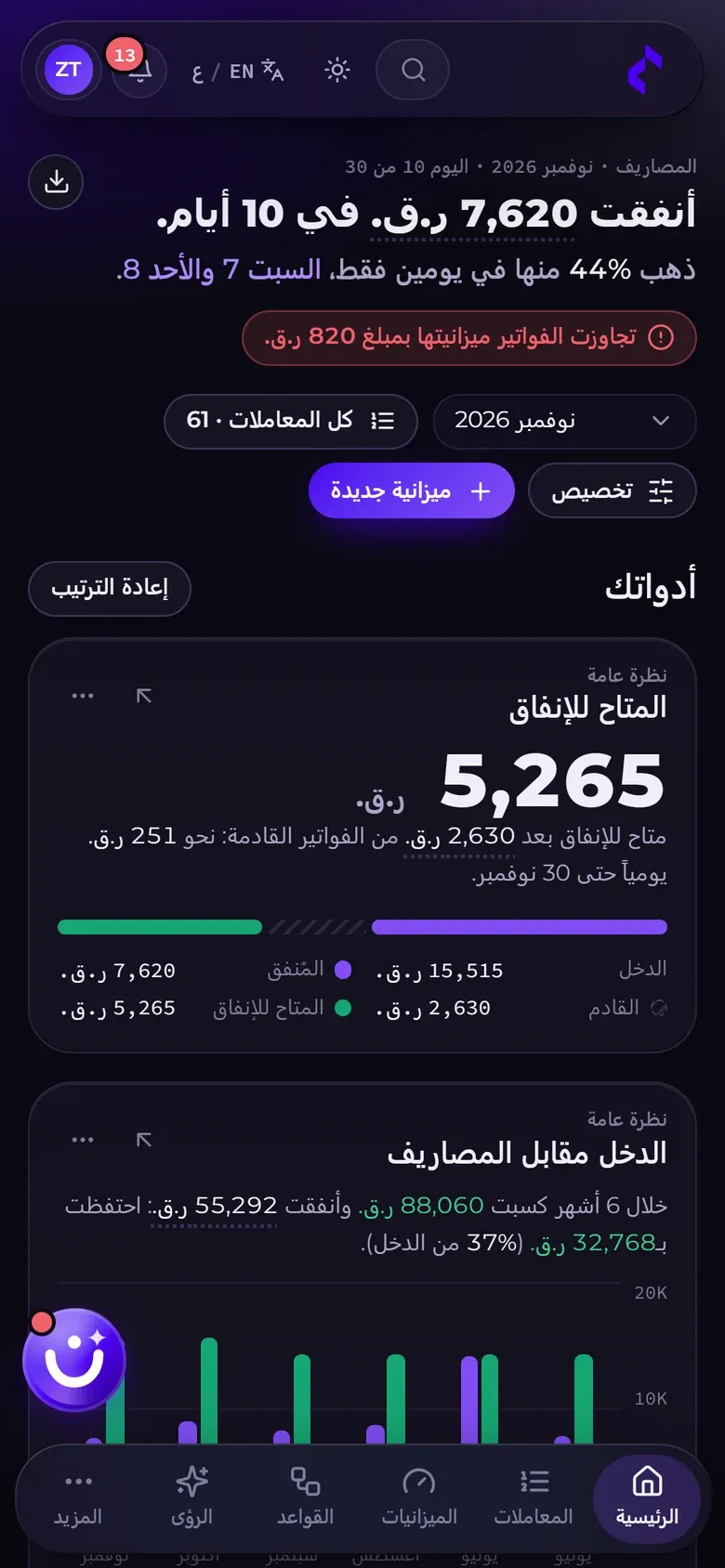
Home opens with one sentence: what was spent, where it went, and what needs attention. Below it, the customer chooses what to see.
A headline, not a chart.
“You’ve spent 7,620 in 10 days. 44% of it went on just two days.” The key figures are links into the detail.
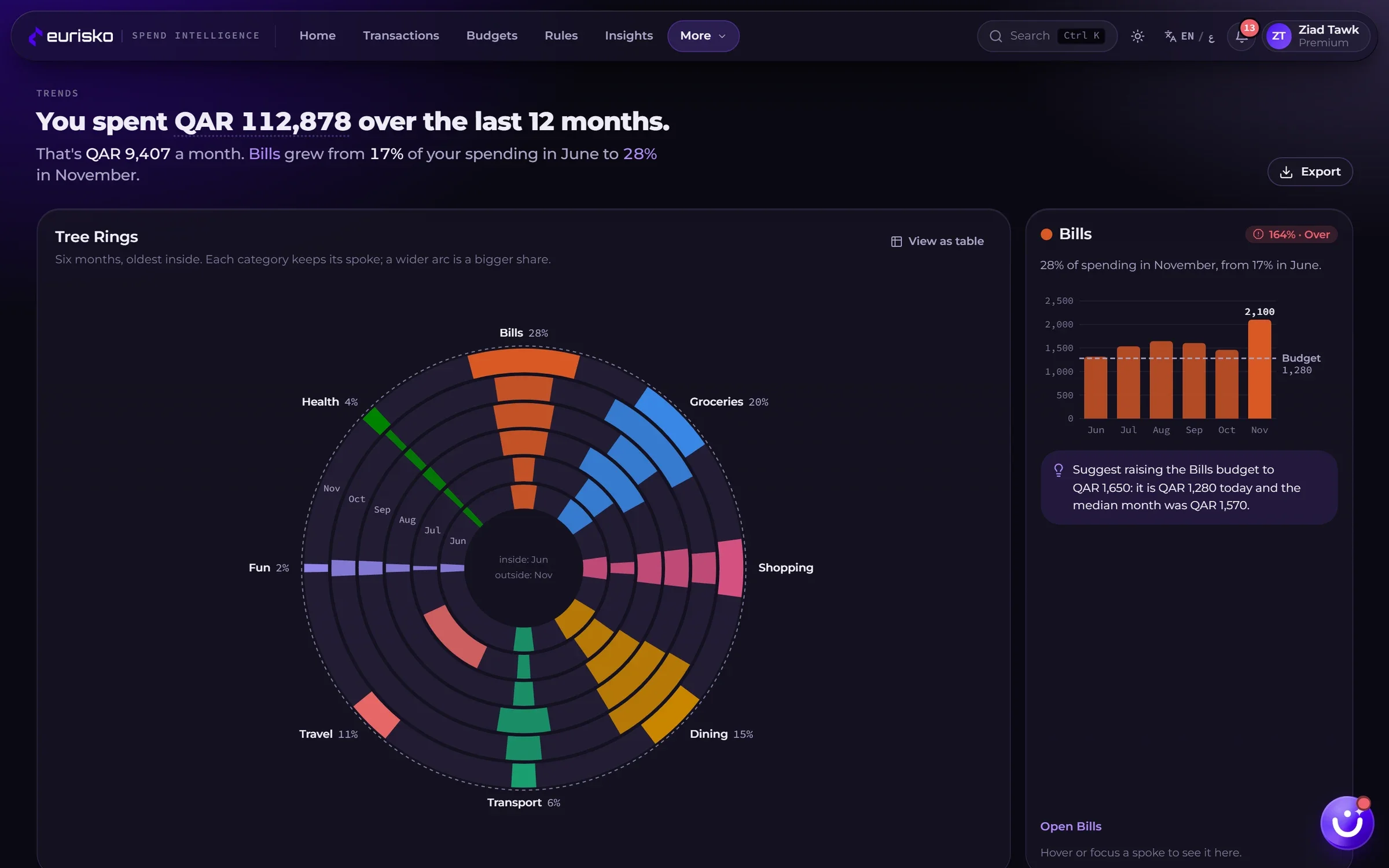
Orbit calendar and month replay.
Categories, subcategories and the thirty days of the month as rings. Press play and the month replays day by day.
A dashboard customers arrange.
Eighteen widgets, from safe-to-spend to top merchants. Customers switch them on, resize and reorder them; the bank sets the defaults for each segment.
Safe to spend.
Income, less what has been spent, less the bills still to come: one number, and a daily allowance until the end of the month.
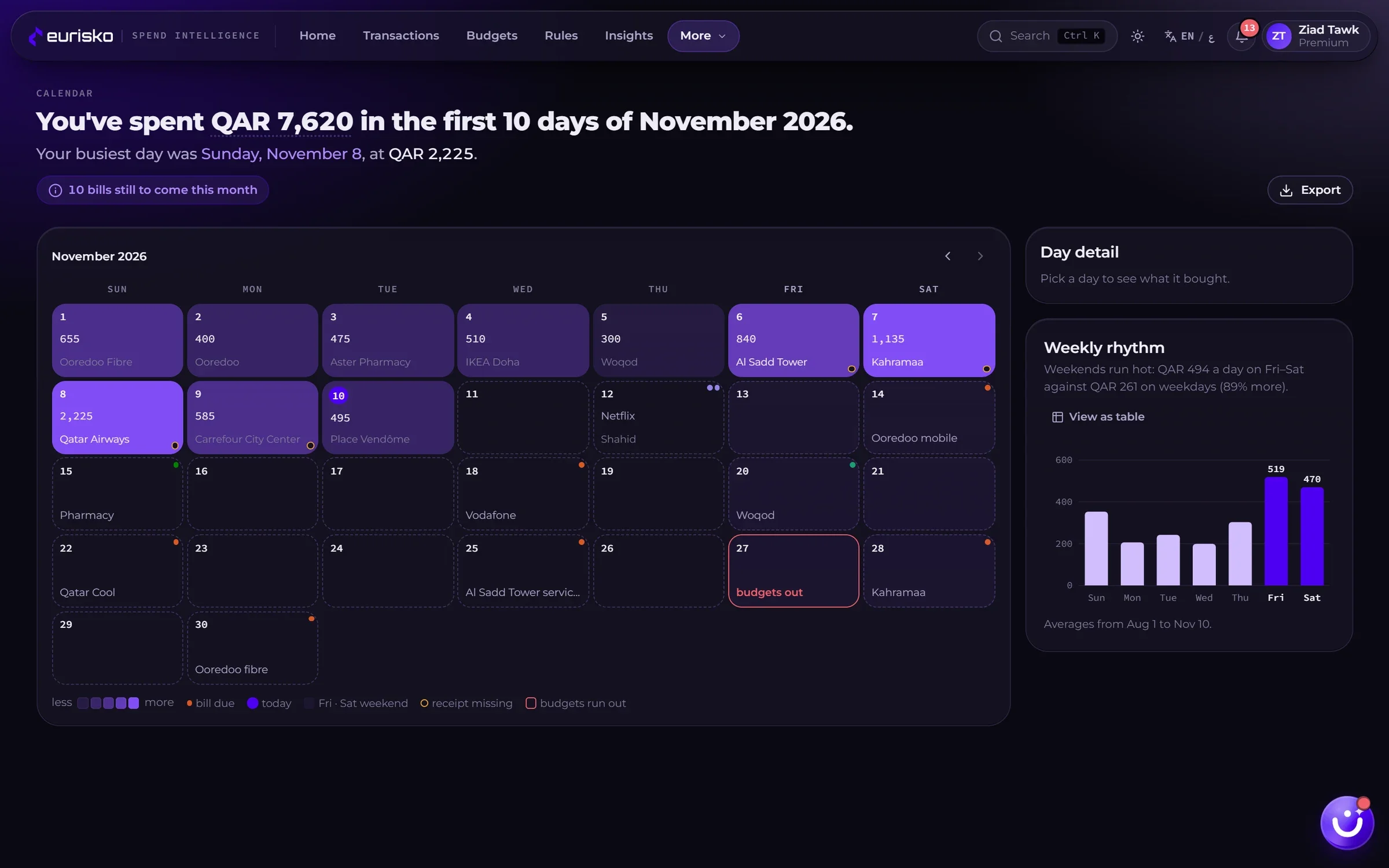
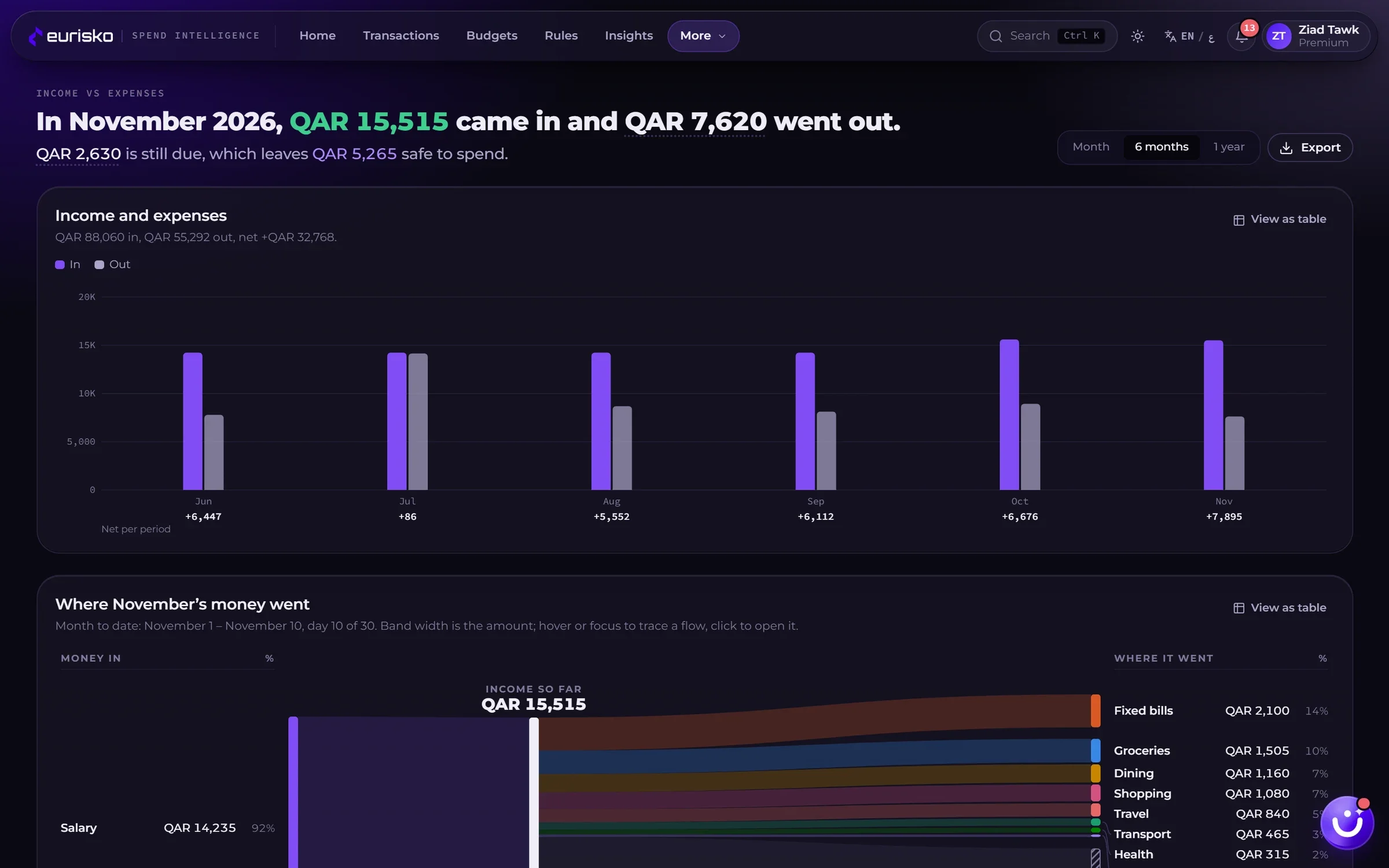
Calendar, trends and income.
A spending calendar with bills on their due dates, month-on-month trends, and a view of income against expenses that shows where the money went.
No dead ends.
Every chart element opens the transactions behind it.
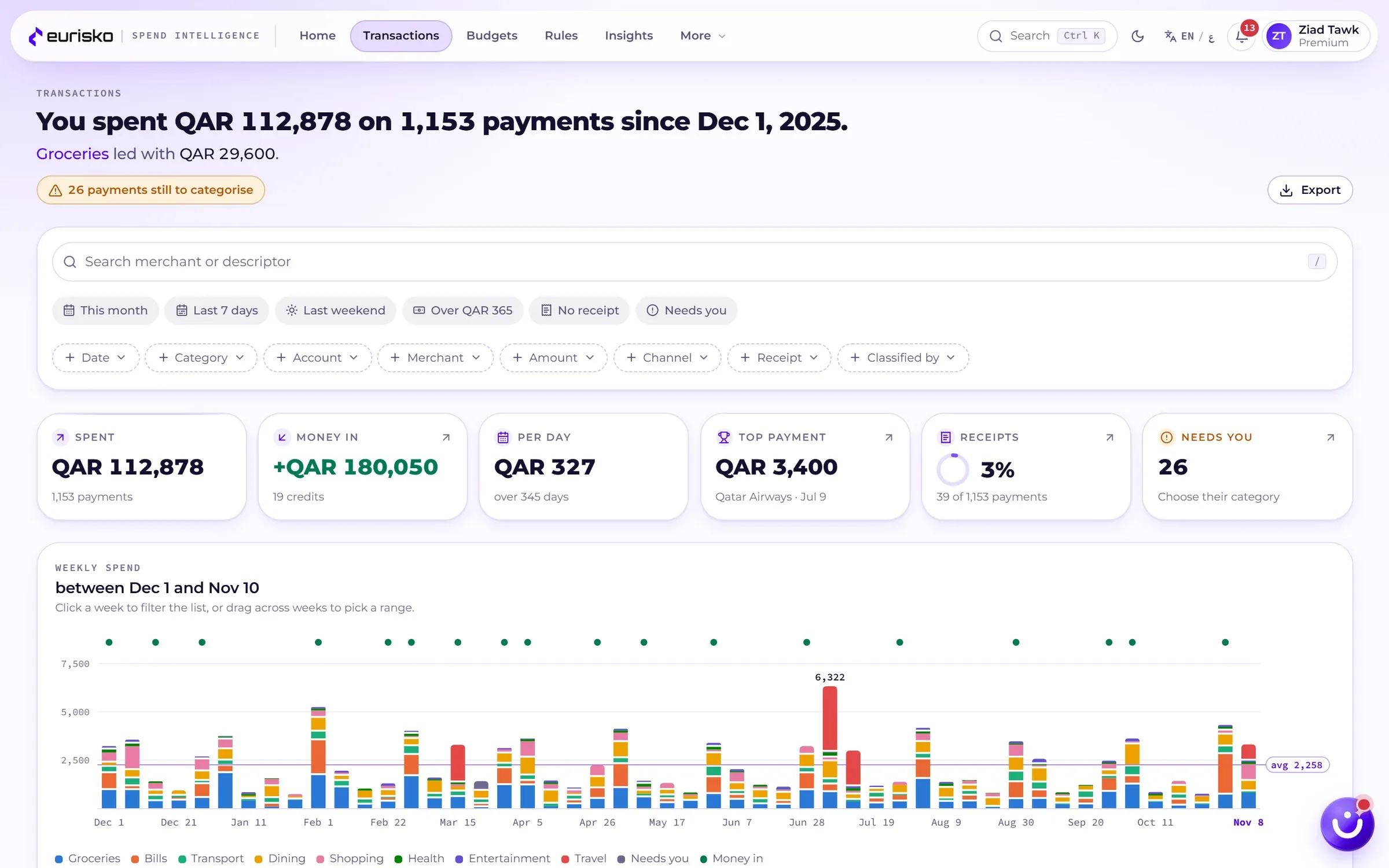
Every transaction categorised, and explained.
Customers stop trusting a money app the first time it files a pharmacy under entertainment. Eurisko PFM shows its work.
- Your rules none matched
- Merchant category code 5411 · Grocery stores Decided here
- AI not needed
- Result Groceries › Supermarket
A fixed, visible order.
The customer’s own rules come first, then the card network’s merchant category code, then AI for what is left. Anything still uncertain is put to the customer, never guessed silently.
“Why it landed here.”
Each transaction shows the chain that decided its category and the step that settled it.
One-tap correction.
Recategorise one payment or many, split a payment across categories, and turn the correction into a rule.
Receipts.
Attach a photo of a receipt. The text is read automatically and matched to the payment.
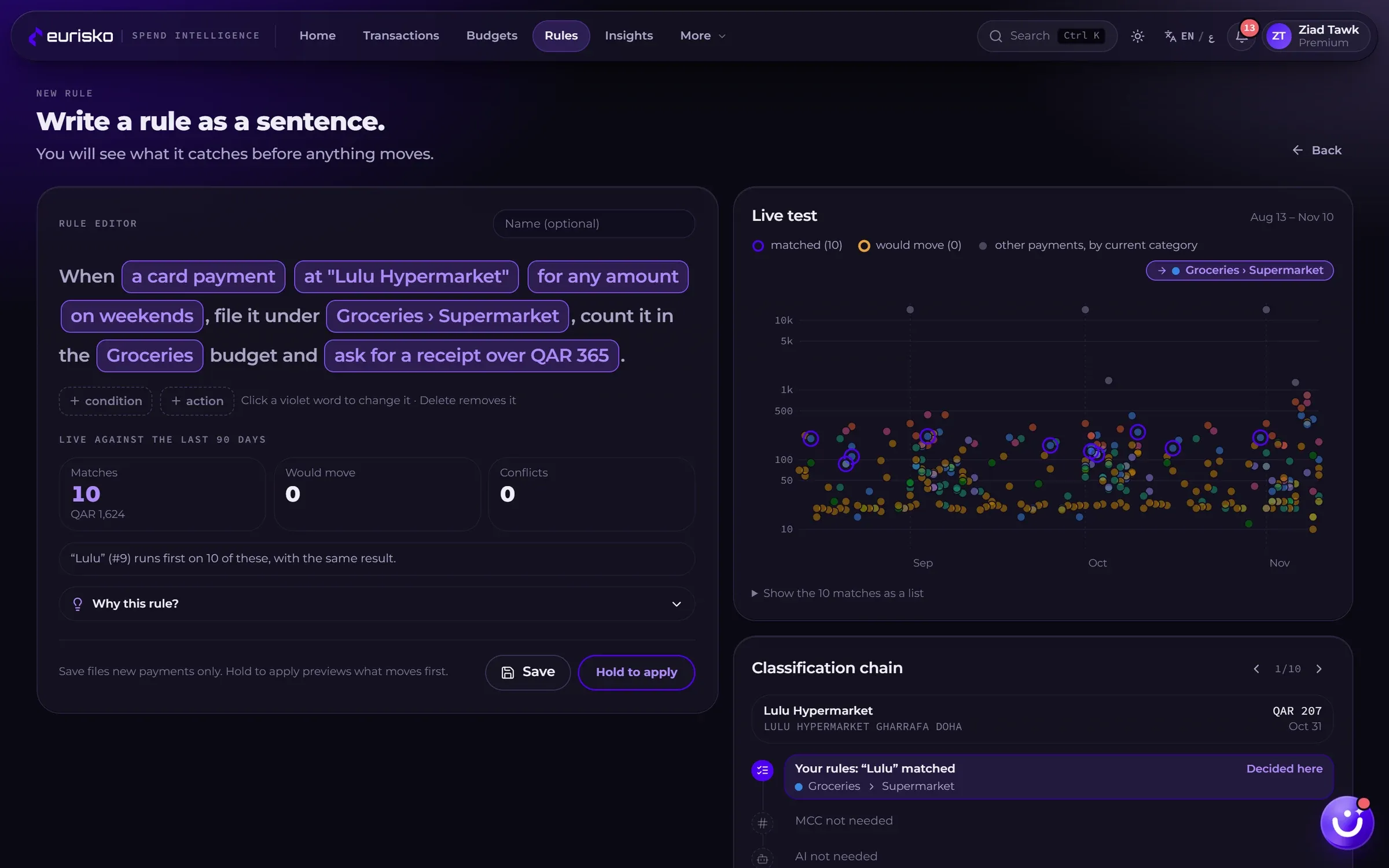
Customers write rules as a sentence.
No forms and no syntax. A rule reads like something you would say.
When a card payment at “City Supermarket” for any amount on weekends, file it under Groceries › Supermarket, count it in the Groceries budget and ask for a receipt over 365.
Tested before it runs.
Each rule is tried against the last 90 days of payments first: how many match, how many would move, and which other rules it conflicts with.
Hold to apply.
Saving a rule previews what it will change. Nothing moves until the customer confirms.
Suggested rules.
Corrections the customer makes by hand come back as suggested rules, ready to accept.
An order the customer controls.
Rules run in a priority the customer can drag, and the explanation says which one decided.
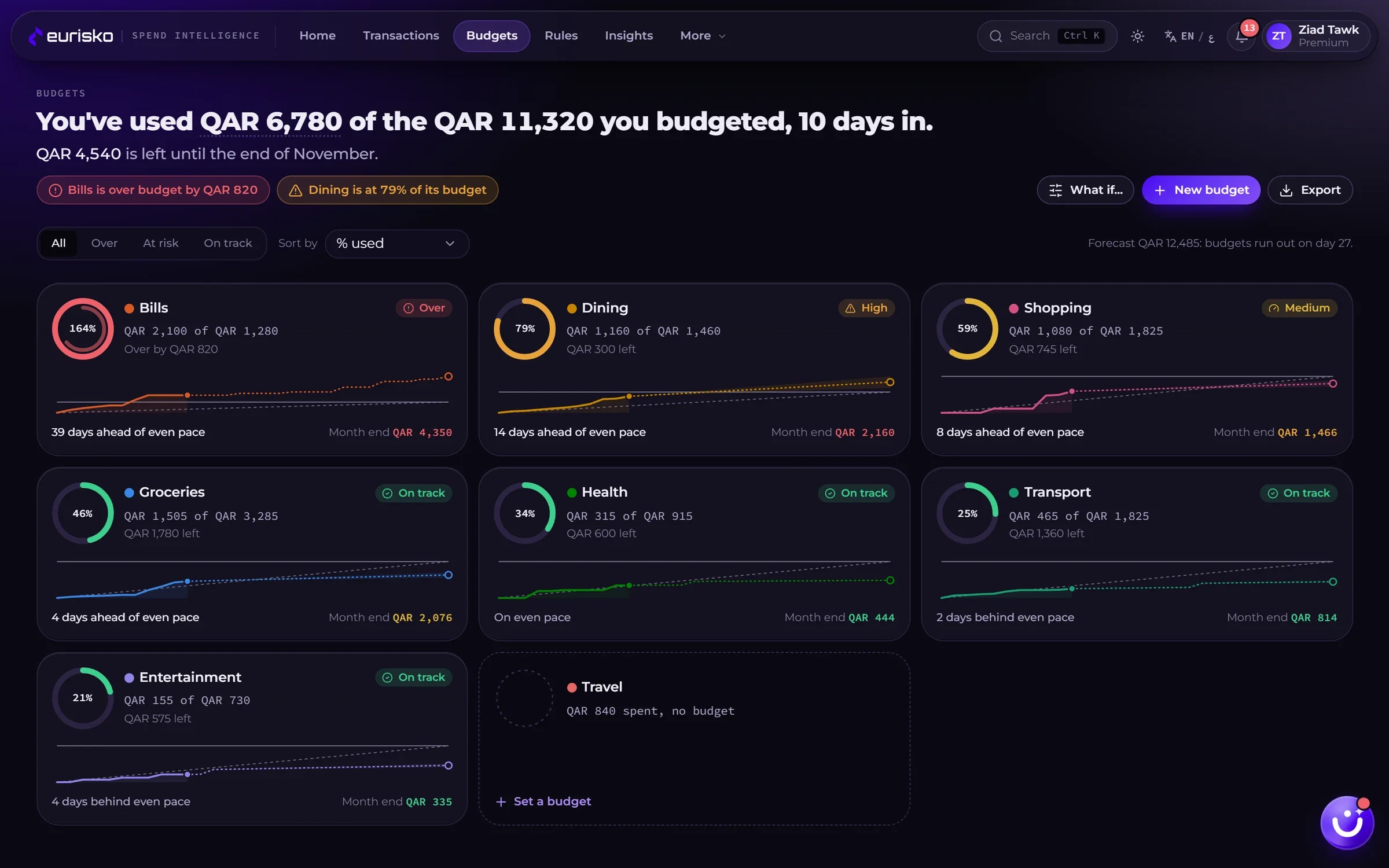
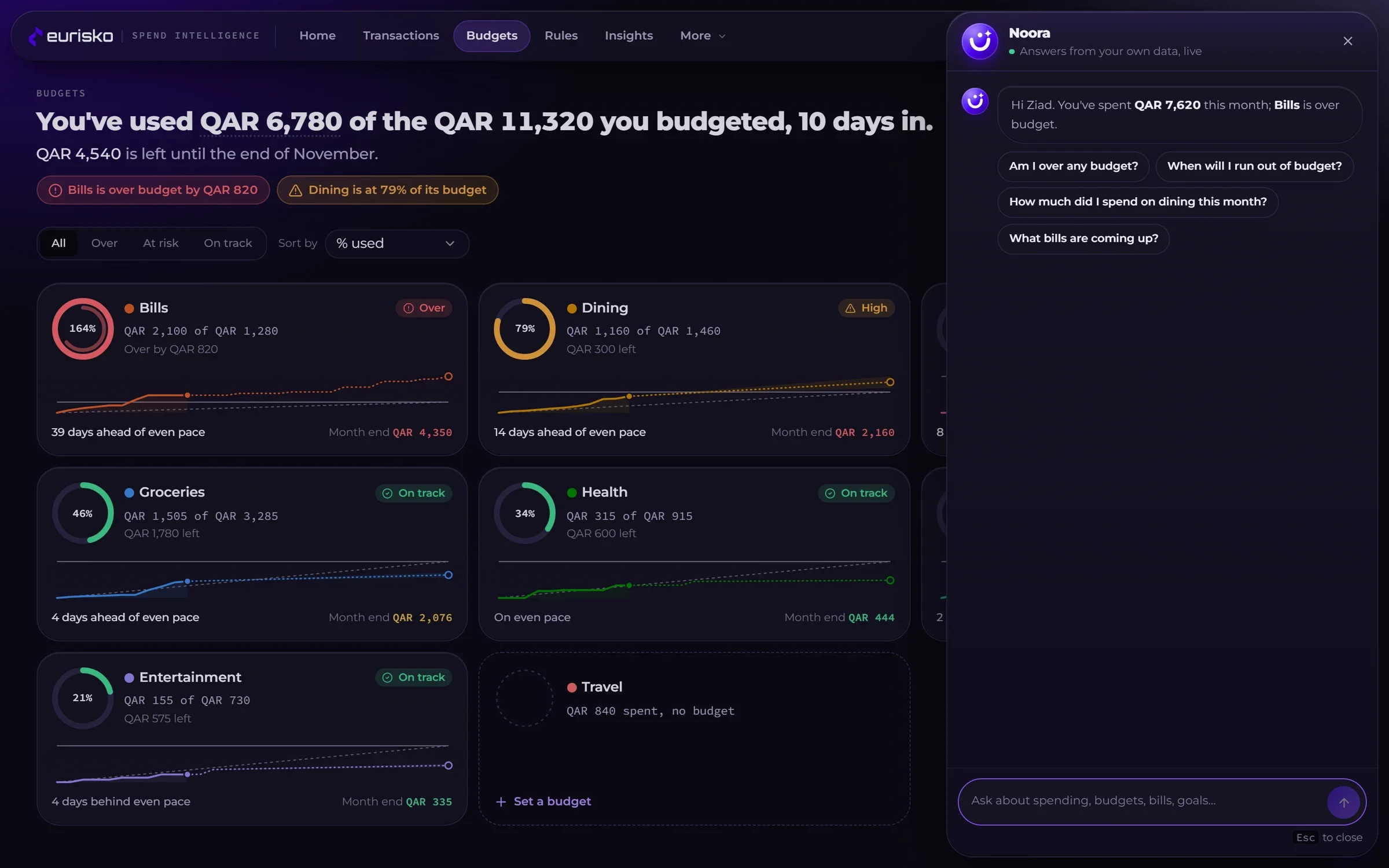
Budgets that warn before the month goes wrong.
A budget is only useful if it tells you something in time to act.
Pace, not just a total.
Each budget shows spending against an even pace, with a forecast to the end of the month and the date the budget will run out.
Four clear states.
On track, medium, high, over: always an icon and a label, never colour alone, with alerts at thresholds the bank sets.
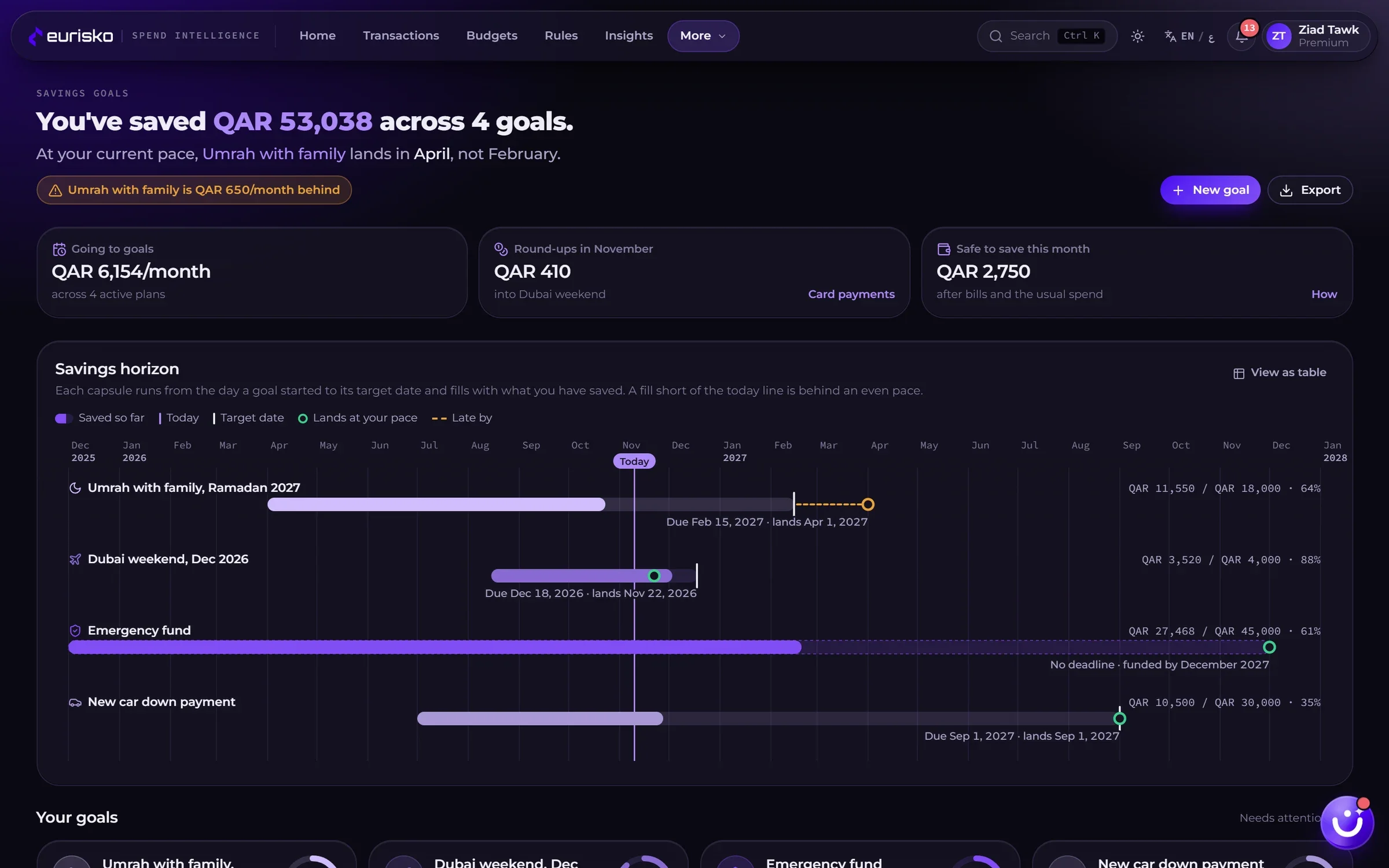
Savings goals.
Goals with a target date, a pace check and round-ups, with presets such as an emergency fund, Umrah, a wedding or a home.
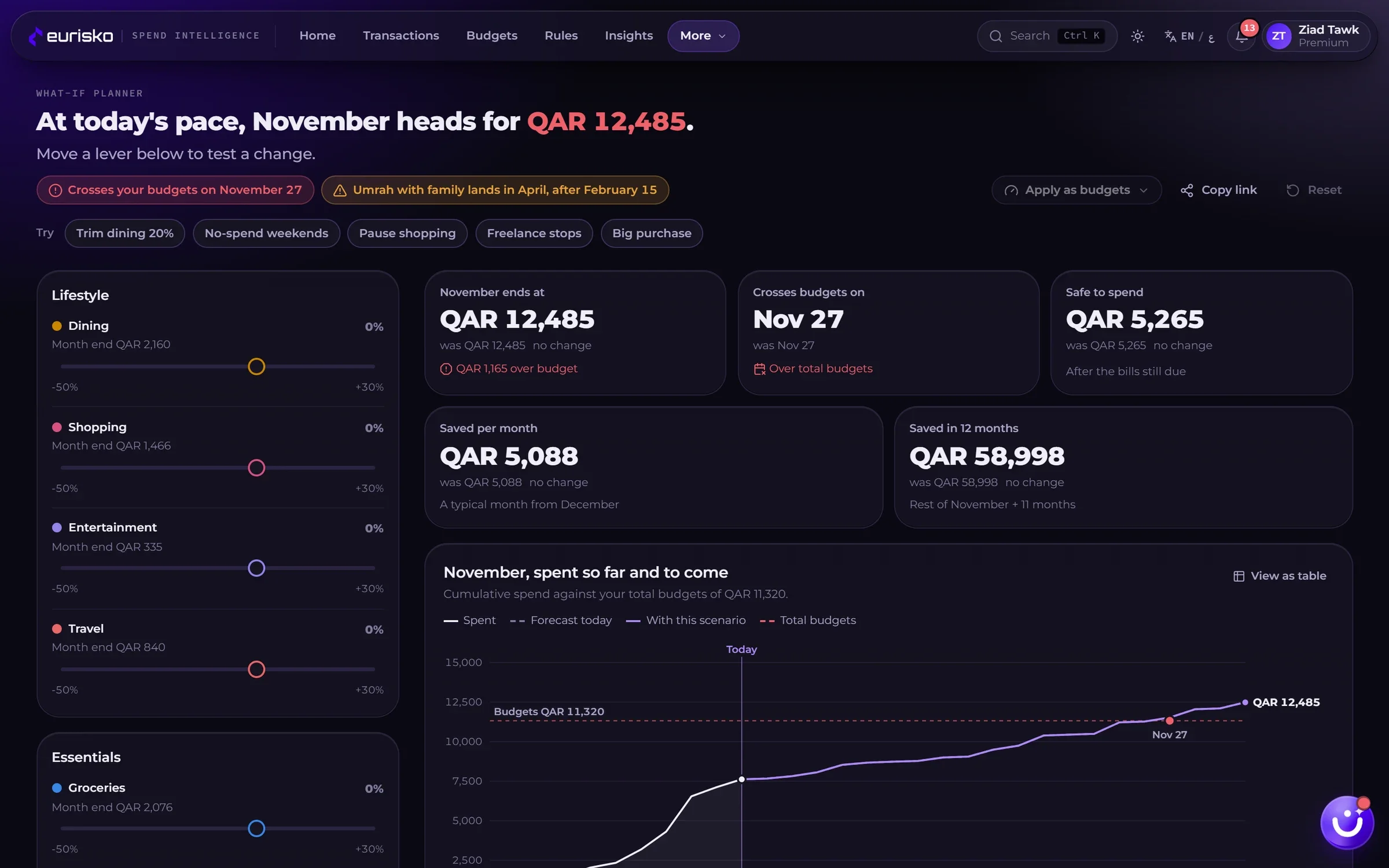
What-if planner.
Trim dining by 20% or pause shopping and see what it does to the month and to each goal’s landing date.
Bills already counted.
Upcoming bills sit on the calendar and are already deducted from safe-to-spend.
Alerts that matter.
A threshold crossed, a forecast that will break a budget, a bill due in two days, an unusual payment, a missing receipt.
Insights with evidence, and an assistant that knows the numbers.
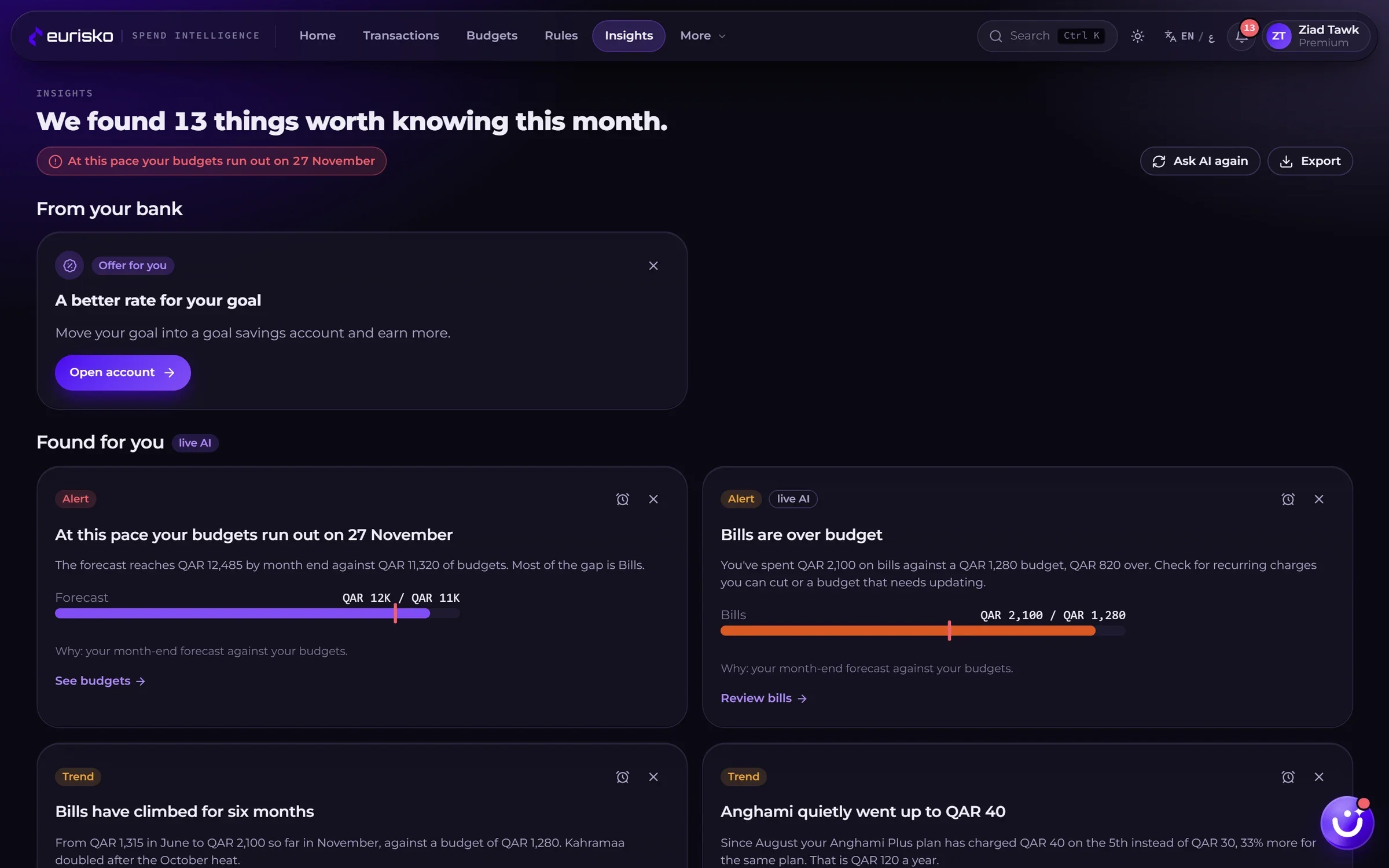
Insights are drawn from the customer’s own transactions and say what to do next.
Insights feed.
Trends, tips and alerts, each with the chart that backs it and a link to act on it.
People like you.
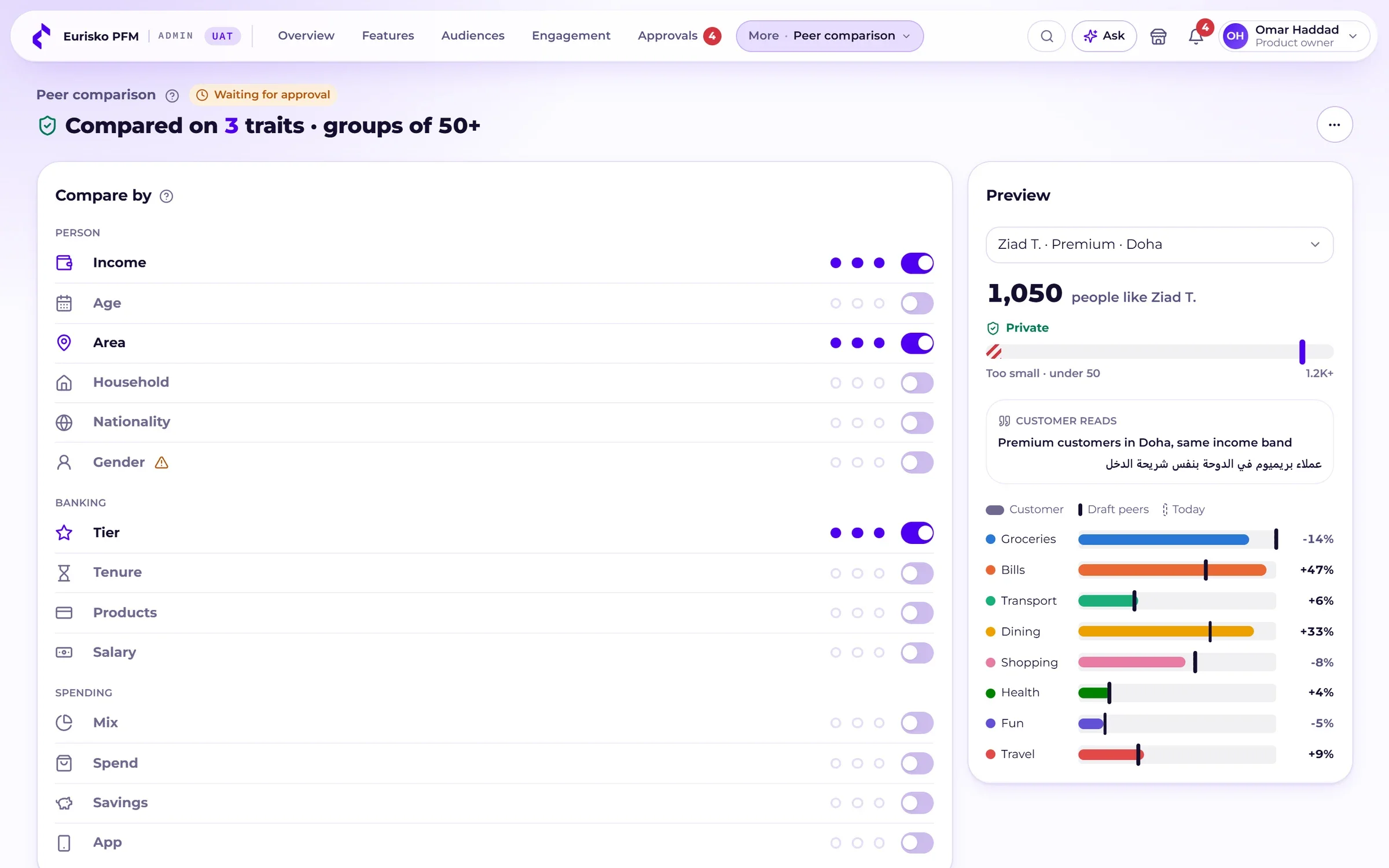
Spending compared with customers of similar income, area and tier, shown only when the comparison group is large enough to keep everyone anonymous.
A money assistant.
Customers ask in plain Arabic or English: “Am I over any budget?”, “What bills are coming up?”. Answers come from their own data. Banks give the assistant their own name and voice.
From your bank.
Offers and nudges from the bank appear beside the insights, clearly labelled, and only for customers they are relevant to.
AI inside the bank.
On Eurisko DXP the AI runs on Eurisko Kortex, inside the bank’s own infrastructure. Customer data is not sent to an external AI service.
Your business team runs it. No release required.
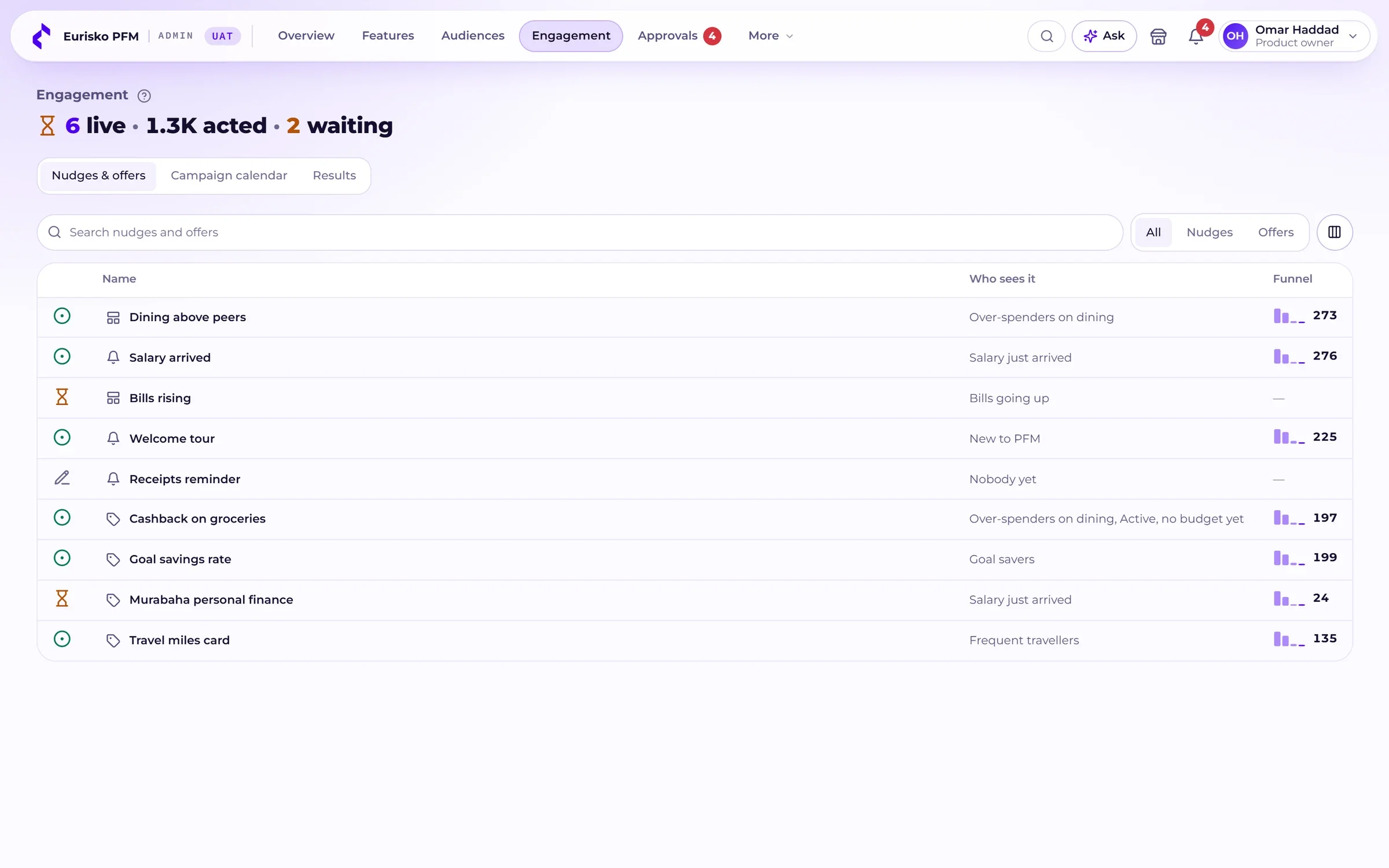
Eurisko PFM ships with a console built for product owners and marketers, not engineers. Every page opens with a one-line status and the decisions waiting for you.
| Feature | Mass | Premium | Private | New to PFM |
|---|---|---|---|---|
| Budgets | On | On | On | On |
| What-if planner | Gradual | On | On | On |
| Receipts with text reading | Off | On | On | Off |
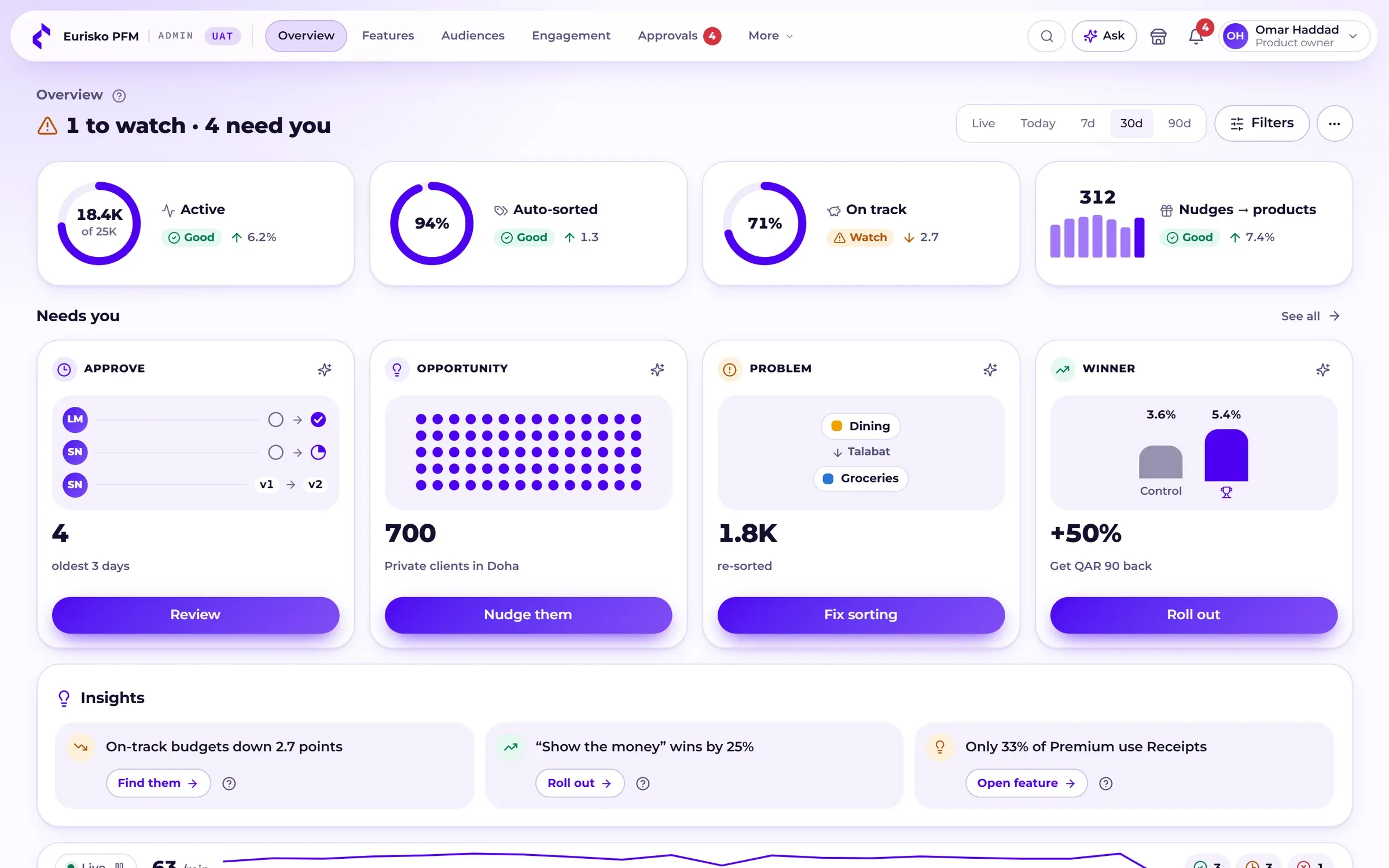
Overview dashboard.
Active customers, the share of payments sorted automatically, budgets on track and nudges that led to a product, with a live activity strip. The team customises its widgets the same way customers do.
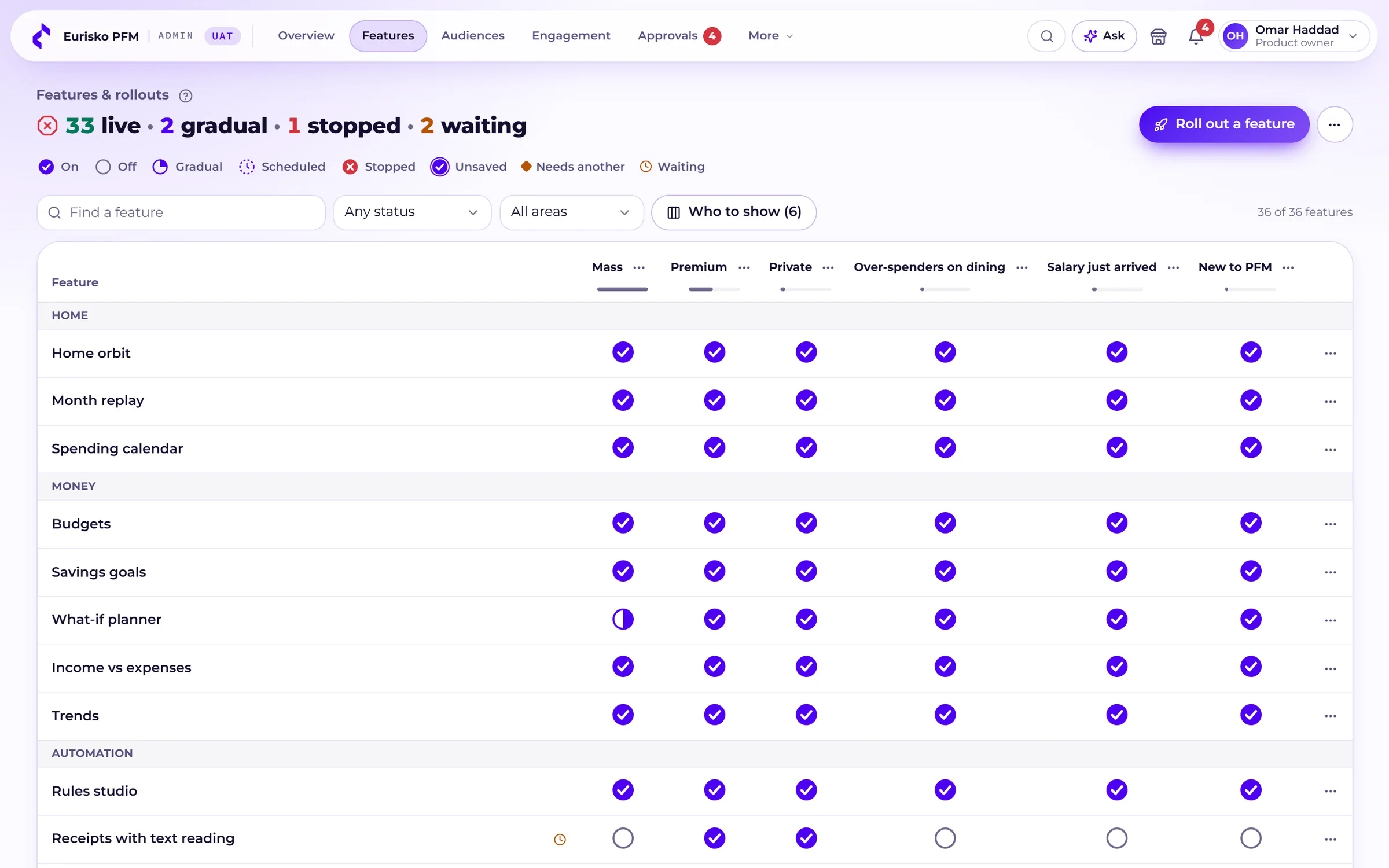
Features and rollouts.
A grid of every feature against every segment. Switch on, switch off, roll out gradually to 5, 25, 50 or 100%, schedule a date, or stop a feature instantly. Preview the app as any customer first.
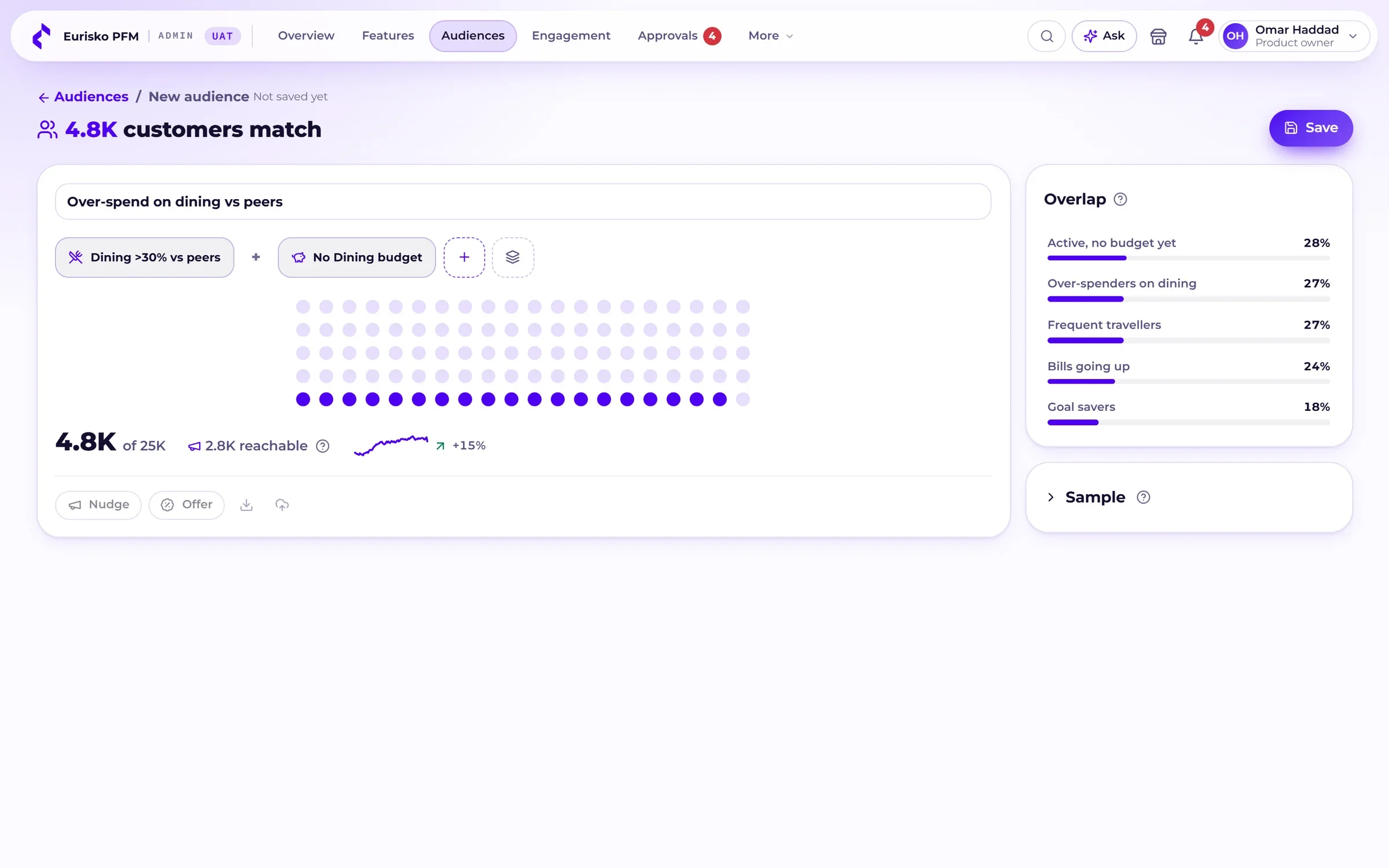
Audiences from behaviour.
Build a segment as a sentence: Premium customers who spend 30% more than their peers on dining and have no dining budget. See its size and overlap before you save it.
Nudges, offers and campaigns.
Send an insight card or attach a product offer, in Arabic and English, with frequency caps, A/B variants and a holdout group that measures the real effect.
Peer comparison settings.
Choose which attributes define “people like you”, weight them, and set the minimum group size. Preview the result on a sample customer before it goes live.
Master data.
Categories and subcategories, merchant names, card category codes, thresholds and customer groups: bilingual, versioned, with CSV import and export.
Sorting quality.
See how payments are being categorised and where customers disagree, and review the uncertain ones. Each fix becomes a merchant or code mapping.
Customer view.
Look up a customer with personal data masked, see their budgets and alerts, and open the app exactly as they see it.
Content and notifications.
A bilingual template library, alert frequency, quiet hours and a Ramadan mode.
Built for a regulated bank.
Changes that reach customers are controlled, recorded and reversible.
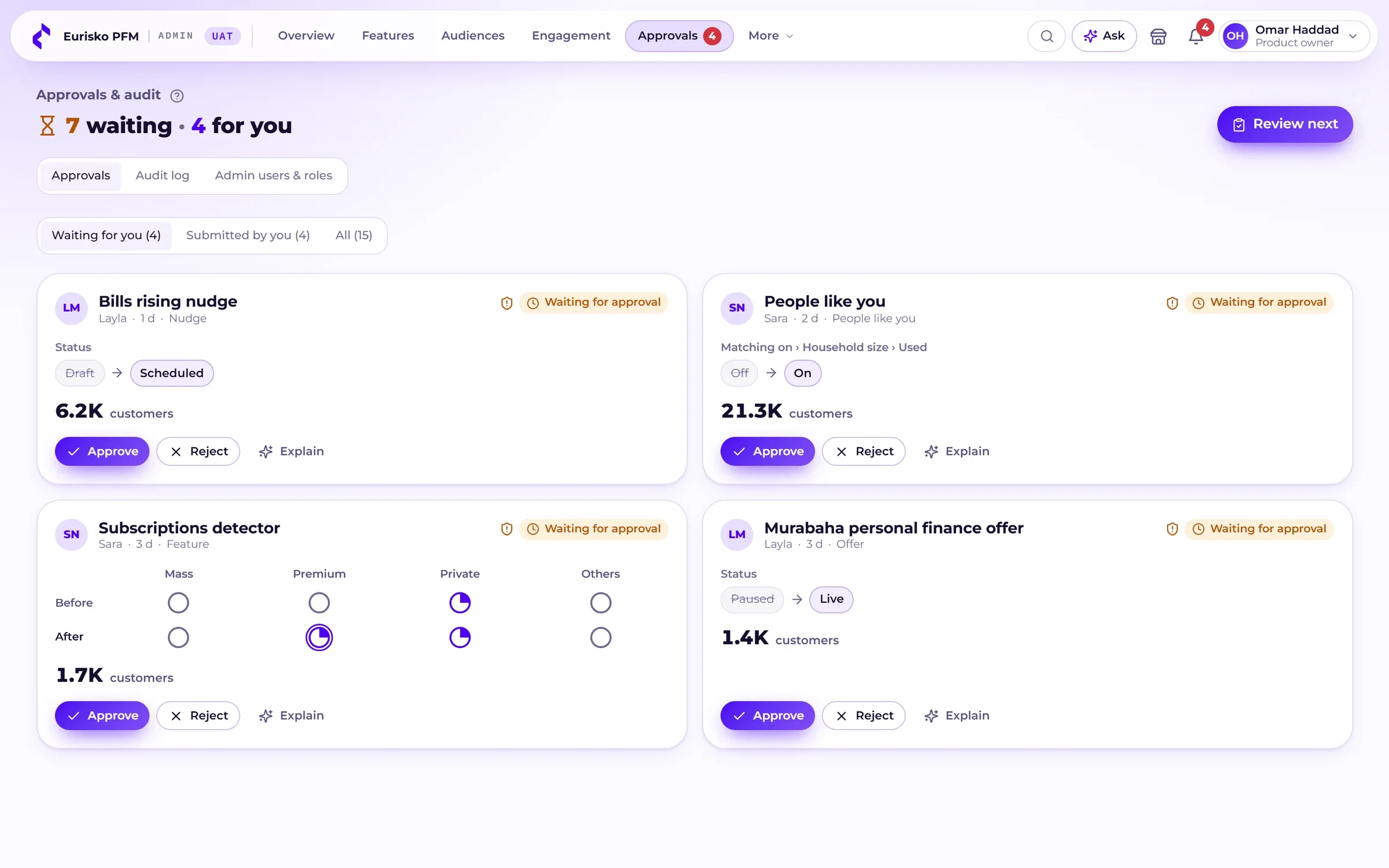
Maker-checker approvals.
A change that reaches customers needs a second person, and riskier changes need more scrutiny.
Versioned and reversible.
Every change is versioned. Restoring the previous version goes through the same approval.
Audit log.
Who changed what, when and why, searchable and exportable.
Roles.
Product owner, marketing, data steward, auditor and super admin, each with the access the role needs.
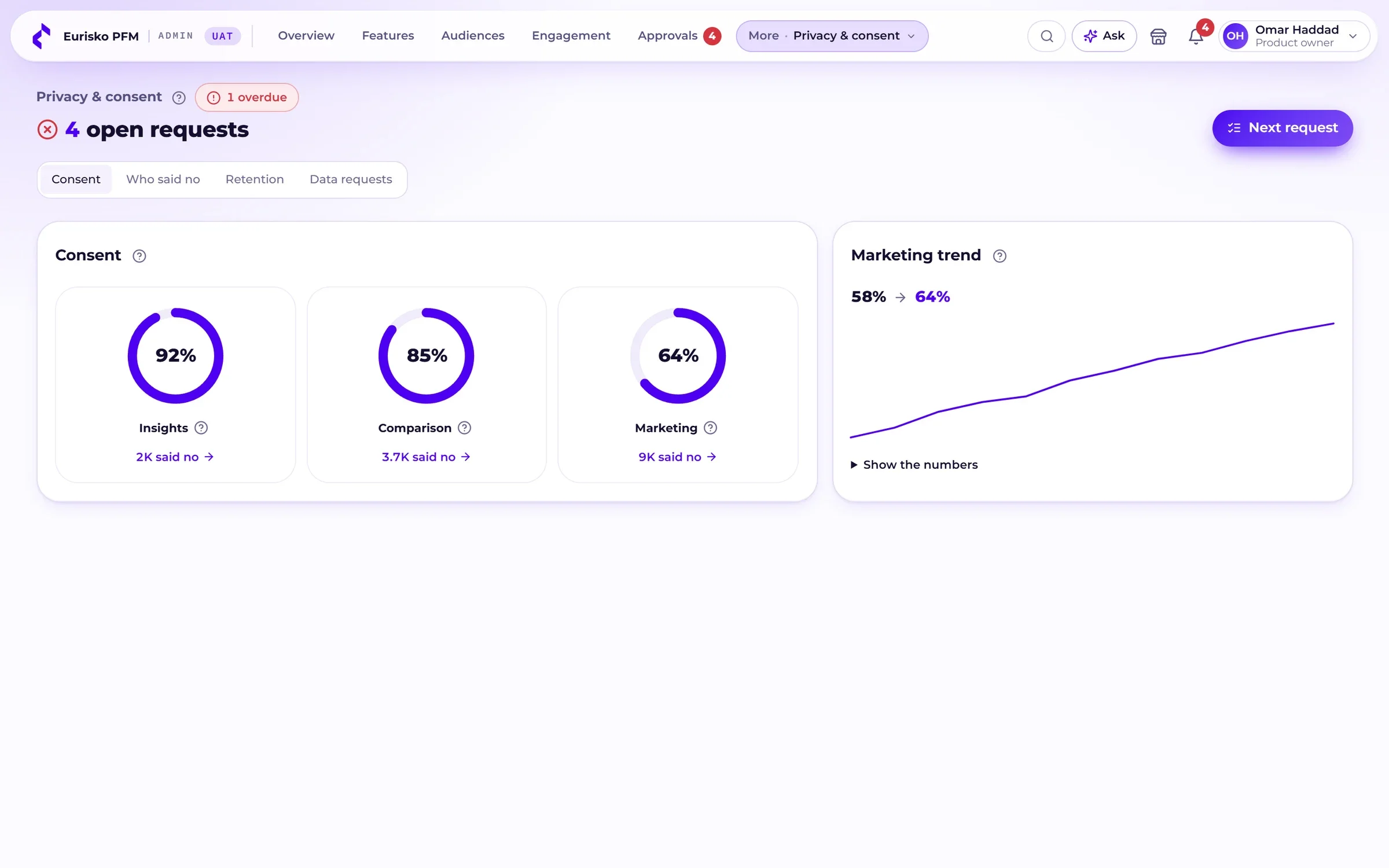
Consent by purpose.
Consent is tracked separately for insights, peer comparison and marketing, and opt-outs are applied to audiences automatically.
Data requests.
Export and deletion requests are tracked from receipt to completion.
Anonymous peer groups.
A minimum group size, 50 by default, is enforced. When a group is too small, attributes are dropped until it is large enough.
Masked by default.
Personal data in the console is masked. Revealing it requires a reason, and the reveal is logged.
Arabic by design, not by translation.
True right-to-left.
Layouts, navigation and charts mirror in Arabic, and customers switch language in-session.
Digits the customer prefers.
Latin or Arabic-Indic numerals, with locale-correct money and dates.
Local rhythm.
A Friday and Saturday weekend in the calendar and Ramadan-aware notification hours.
Readable charts.
Every chart has a text description and a table alternative, and status is never shown by colour alone.
Light and dark.
Both themes are designed, not derived.
Mobile first.
The same product on a phone, with a bottom tab bar and compact visuals.
Runs on Eurisko DXP, or beside the app you already have.
A DXP module.
On Eurisko DXP, PFM is one of the banking service modules: the same identity, design system and release train as the rest of your digital bank.
API-first.
The apps talk to a typed REST API. Transactions, categories, budgets and rules are fed from your core, card system or data platform.
Widgets for your channels.
The dashboard is built from widgets the bank places in mobile and web banking and manages per segment.
Inside your estate.
Deployed with DXP in your own data centre or private cloud, so customer data stays where your regulator expects it.
Why a bank needs more than a spending pie chart.
Three ways to offer money management, compared on what matters after launch.
| Criteria | Eurisko PFM | A basic “my expenses” tab | A third-party PFM widget |
|---|---|---|---|
| Categorisation | Rules, merchant codes and AI, with the reason shown | Merchant code only | Varies, rarely explained |
| When it is wrong | The customer corrects it and can make it a rule | Usually cannot be corrected | Often one payment at a time |
| Who controls rollout | Your business team, per segment | Engineering, per release | The vendor’s roadmap |
| From behaviour to offers | Audiences, nudges and measured campaigns built in | A separate CRM project | Limited, or at extra cost |
| Arabic experience | Designed right-to-left | Translated | Often unavailable |
| Governance | Approvals, versions and audit built in | Depends on the build | The vendor’s console |
| Data and AI | Inside your own infrastructure | Inside the bank | Usually the vendor’s cloud |
Frequently asked questions.
What is personal finance management (PFM) in banking?
Personal finance management is the part of a banking app that helps customers understand and plan their money: spending sorted into categories, budgets, savings goals, forecasts and insights. Eurisko PFM is personal finance management software for banks, with a customer app and a console for the bank’s own team.
What is Eurisko PFM?
Eurisko PFM is Eurisko’s personal finance management product for retail banks. Customers get categorised spending with the reason shown, a dashboard they arrange, budgets, goals, a what-if planner, receipts, insights and a money assistant. The bank gets a console for rollouts, audiences, nudges and offers, master data, privacy, approvals and audit.
How does Eurisko PFM categorise transactions?
In a fixed order: the customer’s own rules first, then the card network’s merchant category code, then AI for anything left. Each transaction shows which step decided its category, and anything uncertain is put to the customer.
Can customers correct a category or create their own rules?
Yes. A customer can recategorise or split a payment in one tap and turn the correction into a rule written as a sentence. The rule is tested against the last 90 days of payments and previewed before anything changes.
What can the bank’s team change without an app release?
Which features each segment sees, gradual rollouts and schedules, audiences, nudges and offers, notification templates and quiet hours, categories and merchant mappings, budget thresholds and the settings behind peer comparison. Changes go through approval and are versioned.
Can we target customers based on how they use PFM?
Yes. Audiences are built from behaviour such as category spending, spending against peers, budget status, goal progress and app activity, combined with tier, area and consent. An audience can drive a feature rollout, a nudge or a product offer, and campaigns are measured against a holdout group.
How does peer comparison protect privacy?
Customers are compared only with groups above a minimum size, 50 by default. If a group is too small, attributes are dropped until it is large enough. The bank chooses and weights the attributes, and peer comparison has its own consent.
Does Eurisko PFM support Arabic?
Yes. Arabic and English are built in, with true right-to-left layouts and charts, a choice of numerals, in-session language switching, a Friday and Saturday weekend and Ramadan-aware notifications.
Do we need Eurisko DXP to use Eurisko PFM?
No. PFM is a module of Eurisko DXP, and it can also run beside your existing mobile and internet banking through its API and widgets.
How is customer data handled by the AI?
On Eurisko DXP the AI runs on Eurisko Kortex inside the bank’s own infrastructure, so customer data is not sent to an external AI service. AI is the last step in categorisation, and the bank’s team reviews low-confidence results in the console.
Money management for Oman’s banks.
As Oman’s banks modernise their digital channels, customers expect more than a balance and a list of payments.
Eurisko PFM adds that layer without a greenfield build: true right-to-left Arabic, a dashboard customers arrange, budgets that forecast, and a console that lets your team roll features out segment by segment.
Eurisko PFM in your market
Editions written for each market’s customers, calendar and language.
Want a walkthrough?
Tell us about your customers and segments, and we’ll walk you through the app and the console on a demo tailored to your market.
Request a demo →